Conditions
Conditions determine whether a Flag is enabled or a Value is returned for a specific context. A Condition consists of one or more Checks. All Checks within a Condition must pass (logical AND) for the Condition to be true. If a Flag has multiple Conditions, only one of them needs to be true (logical OR) for the Flag to be enabled.
Variable Types
The FeatureFlags system supports the following variable types for context evaluation:
String: Textual data (e.g., user IDs, emails, country codes).
Number: Numeric values (e.g., age, count, balance).
Timestamp: Date and time values.
Set: A collection of unique strings (e.g., user roles, permissions).
Operators
Operators define how the variable in the context is compared against the value defined in the Check.
String Operators
Applicable to String variables.
Equal: Checks if the context variable matches the value exactly (case-sensitive).
Contains: Checks if the context variable contains the specified value as a substring.
Regexp: Checks if the context variable matches the specified Regular Expression.
Wildcard: Checks if the context variable matches a wildcard pattern (e.g.,
user-*).Percent: Used for gradual rollouts. Hashes the context variable (usually a user ID) and checks if the result modulo 100 is less than the specified value (0-100).
Number Operators
Applicable to Number variables.
Equal: Checks if the context variable equals the specified value.
Less Than: Checks if the context variable is strictly less than the specified value.
Less Or Equal: Checks if the context variable is less than or equal to the specified value.
Greater Than: Checks if the context variable is strictly greater than the specified value.
Greater Or Equal: Checks if the context variable is greater than or equal to the specified value.
Timestamp Operators
Applicable to Timestamp variables.
Equal: Checks if the context timestamp is exactly equal to the specified timestamp.
Less Than: Checks if the context timestamp is before the specified timestamp.
Less Or Equal: Checks if the context timestamp is before or at the same time as the specified timestamp.
Greater Than: Checks if the context timestamp is after the specified timestamp.
Greater Or Equal: Checks if the context timestamp is after or at the same time as the specified timestamp.
Set Operators
Set variables are sets of strings. In order to use set conditions, you need to pass a set of strings as the value to the context.
Applicable to Set variables.
Subset (Included In): Checks if the set in the context is a subset of the defined set (i.e., all elements in the context set must exist in the defined set).
On web ui side you create new condition with
user_rolesvariable,included inoperator and provide values separated by comma, e.gadmin,superadmin`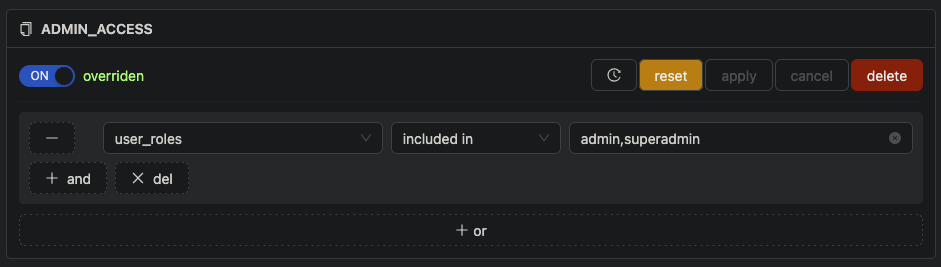
class FlagsDefaults:
    ADMIN_ACCESS = False

manager = HttpxManager(
    url="http://localhost:8080",
    project="my-project",
    variables=[Variable("user_roles", VariableType.SET)],
    defaults=FlagsDefaults,
)
client = FeatureFlagsClient(manager)

@app.get("/admin")
def admin():
    auth_user = User(role="admin")

    with client.flags({"set": {auth_user.role}}) as f:
        if f.ADMIN_ACCESS:
            return "Admin access granted"

        return "Admin access denied"
Superset (Includes): Checks if the set in the context is a superset of the defined set (i.e., the context set must contain all elements of the defined set).